
Voice control needs an iPhone 15 Pro or newer with Apple Intelligence turned on. Check Settings > Apple Intelligence & Siri on the phone. If Apple Intelligence was just turned on, it downloads for a few minutes first. Also check that Use voice control is on under Voice Control on the Profile tab, and that the stop's data has finished loading.
Voice Control
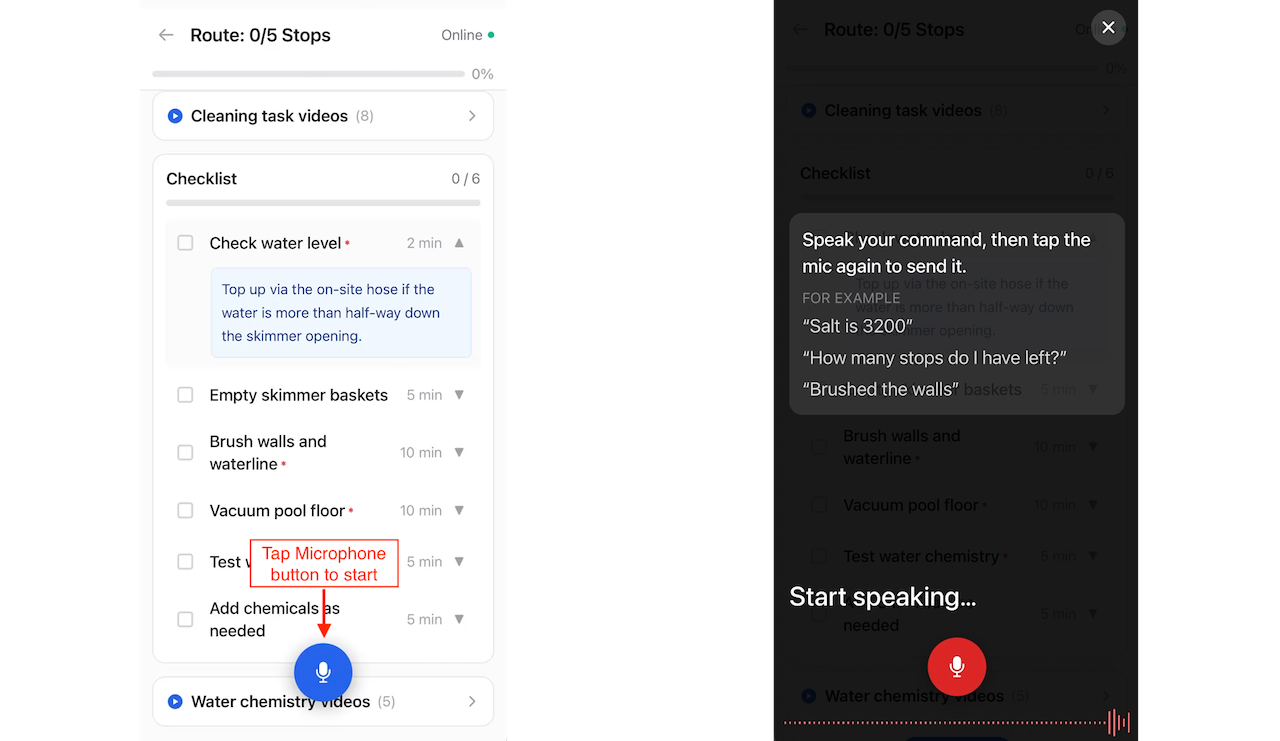
Voice control lets you record your work by talking instead of typing. While you are at a stop, tap the microphone button on the route screen and say what you measured, what you added, what you finished, or what the office needs to know. The app understands you on your phone, confirms anything it is about to save, and reads its answers back so you can keep your hands and eyes on the pool.
Voice control works in English and Spanish, and it also works with no cell signal.
What you need
Voice control uses the on-device intelligence built into recent iPhones, so it is only available where the phone can run it:
iPhone 15 Pro or newer running iOS 26 or later
Apple Intelligence turned on in the iPhone's Settings app (Settings > Apple Intelligence & Siri)
Voice control is an iPhone feature and is not available on the Android app: Android users see no microphone button on the route screen and no Voice Control card on the Profile tab. If your iPhone does not meet these requirements, the microphone does not appear on the route screen. The Profile tab explains why under Voice Control.
Everything voice control does happens on your phone. Your speech is transcribed and understood by the iPhone itself, not sent to a cloud service, which is why it keeps working with no signal. What you said and how the app responded is recorded so we can keep improving it.
Start talking
Open a stop on the route execution screen.
Tap the microphone button at the bottom of the screen. The first time, iOS asks for permission to use the microphone and speech recognition.
Say one thing, the way you would say it to a coworker.
Tap the microphone again to send. When you pause, the button pulses to remind you.
The app shows what it heard, then what it is going to do about it. If you misspoke, tap the X beside the live transcript to discard it and try again. Tap the X in the top corner to close the conversation.
Say one thing at a time, then send. You can chain a couple of things with "and": "the pH is 7.4 and the chlorine is 2", and the app records both. Long run-on sentences are harder to understand than two short ones.
Every save is confirmed
Voice control never writes anything without asking. When you say something that records work (a reading, a chemical, a checklist item, a note), the app shows exactly what it is about to save with Cancel and Confirm buttons. Nothing is written until you tap Confirm.
A green check next to an item means it was saved. A question mark means the app needs one more thing from you first (see Properties with more than one pool below).
What you can say
Record water test results
Name the measurement and the number. The app knows the usual names and abbreviations: free chlorine, total chlorine, pH, alkalinity, calcium hardness, cyanuric acid or CYA or stabilizer, salt, phosphates, temperature, and more.
"pH is 7.6"
"Free chlorine is 1.5"
"Salt is 3200"
"Phosphates are 50 and total chlorine is 3.2"
Readings you say in one breath are saved together as one set of readings for the pool.
Record chemicals and parts you used
Say the amount, the unit, and the product. The product has to be on your truck, and the app matches your words to the truck's catalog name.
"Added a gallon of chlorine"
"I put in half a gallon of acid"
"Three pounds of cal hypo"
"Used two tabs"
"Used one skimmer basket"
Units work in the forms you actually say them: gallons, quarts, fluid ounces, pounds, ounces, bags, buckets, tabs. If you name a unit the product is not stocked in, or more than you have on the truck, the app tells you instead of guessing.
Check off the checklist
"Mark all checklist items done"
"Brushed the walls"
"The skimmer baskets are done"
"Check off the first item"
Name the task the way it is written on the checklist, or say which number it is. "All" or "everything" ticks whatever is still open.
Leave notes
Say who the note is for. There are three kinds, and only one of them reaches the customer:
Note for the customer: "Note for the customer: water looks great" or "Tell the customer I replaced the filter cartridge"
Note for the office: "Tell the office the pump is leaking" or "Let the office know I could not get in today"
Service note: "Add a service note that I backwashed the filter"
The app saves the message itself, not the words you used to ask for it: "Tell the office the gate code changed" is saved as "The gate code changed."
Report work that needs a work order
"Put in a work order to replace the salt cell"
"We need to come back and fix the pump"
Asking for a work order, a quote, or a return trip adds an item to the visit for the office to price and schedule. Mentioning a problem ("the pump is leaking") becomes a note for the office instead, so the office decides whether it is billable.
Ask about the stop
Voice control can answer from what the app already knows about this stop and today's route:
"What is the gate code?"
"Is there a dog here?"
"What did we do here last time?"
"How many stops do I have left?"
"What is on the checklist?"
If the information is not on file, it says so rather than inventing an answer.
Move between stops
"Show me stop three"
"Go to the next stop"
"Open the last stop"
This changes which stop is on screen. It does not start driving directions.
What it will not do
Voice control saves typing, not tapping. Anything that already has its own button on the route screen (On My Way, Arrived, Complete Stop, Skip Stop, Directions, the camera) is not a voice action. If you ask for one, the app points you to the button.
It also stays out of anything that is not about your day. Ask it for a joke, the weather, or how to treat a green pool, and it declines.
Properties with more than one pool
At a property with two or more bodies of water, a reading or a chemical needs to know which one. If you did not say, the app asks ("Which one: Main Pool, Spa?") and shows a button for each. Tap one, or say it: "the spa", "main pool", or "the first one". Once you have answered, the item moves below your answer with Cancel and Confirm, and nothing is saved until you confirm.
You can also name the pool up front: "pH is 7.4 in the spa".
Hearing the answers
The app can read its answers and questions out loud, so you do not have to look at the screen. Turn this on or off under Voice Control on the Profile tab with Speak answers out loud.
iPhones ship with a basic voice for each language, and it sounds like it. If the Profile tab shows A better voice is available, install a higher-quality voice from the iPhone's Settings app under Accessibility > Read & Speak > Voices. The app picks it up as soon as you come back.
Turning voice control off
Voice control is on by default. To hide the microphone, open the Profile tab and turn off Use voice control under Voice Control. The setting is saved on your phone.
Working in Spanish
Switch the app to Spanish on the Profile tab and voice control follows: it listens in Spanish, understands Spanish measurements and units ("el cloro libre es 1.5", "medio galón de ácido", "dos tabletas"), and answers in Spanish. Pool names are whatever the office typed, usually in English, so at a property with more than one pool you can answer "la alberca", "el spa", or "la primera", or just tap the button.
Tell us when it gets it wrong
Every answer and refusal has a thumbs up and thumbs down beside it. Use them, especially the thumbs down. We review the feedback so that voice control can learn the way your crew actually talks.
Troubleshooting
I don't see the microphone button
It says "You haven't arrived at this stop yet"
Readings, chemicals, checklist items and notes are recorded against a visit that has started. Tap Arrived first, then say it again. Questions about the stop work at any time.
It heard me wrong
Tap the X beside the live transcript to throw away what it heard and say it again. Speaking a little more slowly helps with numbers; "seven point four" is more reliable than a fast "7.4".
It says it can't work with that one
Occasionally the phone's built-in safety filter refuses an ordinary sentence. Say the same thing a different way, usually with a different word for the equipment, and it goes through.
It confirmed something I didn't mean
Tap Cancel on anything you do not want saved. If you already confirmed, correct it the way you would a typed entry: remove the reading in the Chemistry Readings section, adjust the chemical usage, or edit the note. Then give the answer a thumbs down so we can fix it.
For the rest of what you can do at a stop, see The Route Tab. For the AI assistant that interprets your readings, see PoolIQ.
Was this helpful?
Was this helpful?